Pre-Launch Jitters
This is it!
Clockinator Pro has been a long time coming, but it’s finally almost here! A project I started back in 2023, it has evolved into so much more than just a simple clock on the wall.
What Makes Clockinator Pro Special?
From the lazy beginnings in the spring 2023, I wanted to take a different approach from the way artwork was handled than in the original Clockinator. That app grew bigger and bigger with each new clock face. All of the art was embedded in the app that you get from the initial download. Each time we added a couple of clocks, it’s download size grew, sometimes by a lot. So a whole different architecture was developed that allowed for loading new images without having to recreate the software every time.
On July 4, 2024, we put a 65inch tv on the wall in portrait mode in our living room. Talk about a vanity project! My clock was always on, had fun artwork, and could be easily updated. It grew and grew. My early experiments on the clock were crazy and a lot of fun. And messy.
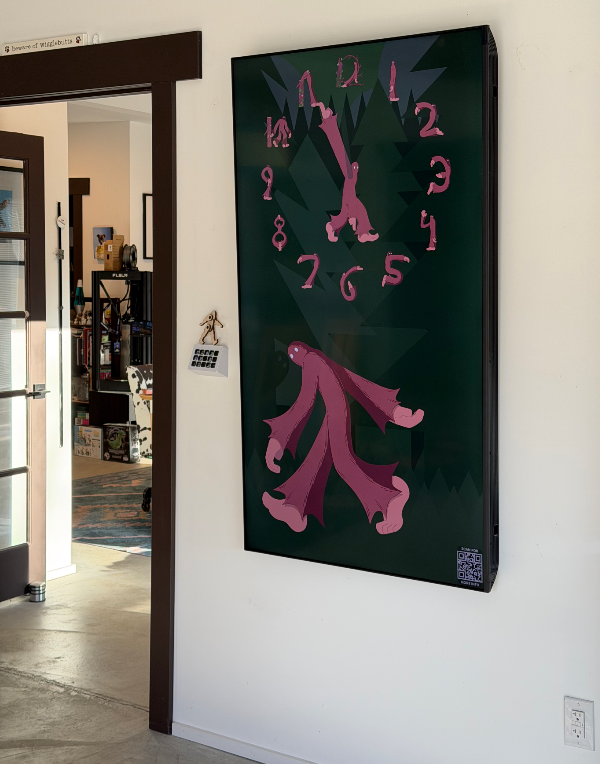
In August of 2024, we had the great idea to give our moms actual physical clocks for Christmas, so while I began again working on the software from scratch, Tim started building clock cabinets that would include a Mac Mini and a 27 inch screen. Suddenly “Kiosk Mode” became a thing.
I spent the next 5 months polishing the app and getting it ready to be released into our parent’s houses with only occasional developer supervision. I started hiring artists again (we had artists contribute on the original Clockinator, too), developing some really fun designs. Shout out to Charlie, Koreena, Trea, and now Henry, for helping me get some great designs together.
The Christmas gifts were a huge success. The folks would call me all giddy every time a new clock face showed up. I had coded it so that it would change based on the seasons (winter, spring, summer, fall, Christmas, Valentines day, St Patricks Day, Pride Month, and Halloween). And there were enough faces by then to make them change every 15 minutes too! But they were too successful.
Our folk’s friends all wanted clocks.
At the time I was logging on to the clocks remotely and putting new clock faces on them, but there was no way I was going to be able to do that for a wider audience. So about a year ago, I started planning for the App Store.
First step was to get it running on an iPad. Check. Then get it running where it can update the faces on its own. Check. Then it was get the update management working and queueing properly. Check. Piece by piece it all started coming together.
And all the while I was still churning out artwork and working with my artists.
So here we are, on the eve of it’s release. It will be in the App store for both macOS and for iPad in a few days. There are 157 individual clock faces that are available for it at launch. I have at least 10 more in the pipeline for release before the end of June. There are 23 custom animations that can be combined to create some crazy motions while tracking the second hand around the clock.
How Much to Charge for All This?
Clockinator Pro is free, but it only comes with 1 clock built in. There are 9 other clocks that you can get from the Clock Gallery that are free. So you’ll have some basic representation of the four seasons all for free.
But where it really shines is when you have more clocks. The individual clocks are all priced at 99 cents, but basic groups can be purchased for 4.99. Right now the groups tend to contain 10 or 15 clocks each, so 4.99 is a deal. But wait, there’s more! for $19.99 you can have all the clocks. Twenty bucks, 157 clocks (at launch). What’s more is that buying a group gets you all of the clocks now in the group and all of the clocks released to that group in the future. So you literally can have every clock, ever, for $20.
And if that’s too steep for you right now, you can buy the clocks you want one at a time. If you have more than a few clocks in any group the price to finish that group gets cheaper. If you have enough clocks in the group the final price for the rest of the group will even go down to just 99 cents. And that includes the $20 one. Buy enough clocks, or enough groups, and the $20 one will only cost you 99 cents more. Of course, it’s still cheaper to just buy the $20 one up front, but you do you. I’ll keep paying my artists and we’ll keep producing fun clocks for you to enjoy.
Thanks Everyone
Thanks for the fun artwork, the clock would just be a clock without it. Thanks for the philosophical discussions about users and their interactions, and for making me make the software better. Thanks for the encouragement on all fronts. Now it’s time to start working on Clockinator Pro 2.0.
Oh, and if you’ve read this far and are interested in drawing clocks for me or even just for yourself, Contact me and we can have that discussion.